
A 6 × 9 in book template for Word
By Lukas · updated
6 × 9 inches is where most self-publishing guides start, and it suits non-fiction and long novels. This template is a whole book in Word at that size, ready to write over and export as a PDF for KDP.
Download the template (.docx, 15 KB)
It opens as a finished book: a title page, the copyright page on its back and a dedication, then three chapters of Pride and Prejudice standing in for yours. Each chapter starts on a right-hand page. Your name runs over the left pages and the title over the right ones, except on a chapter’s first page, and the page numbers start at 1 with chapter one. The running heads are set once, in chapter one, and the other chapters take them over. Short notes at the start of each chapter say how to add one and how to change the margins.
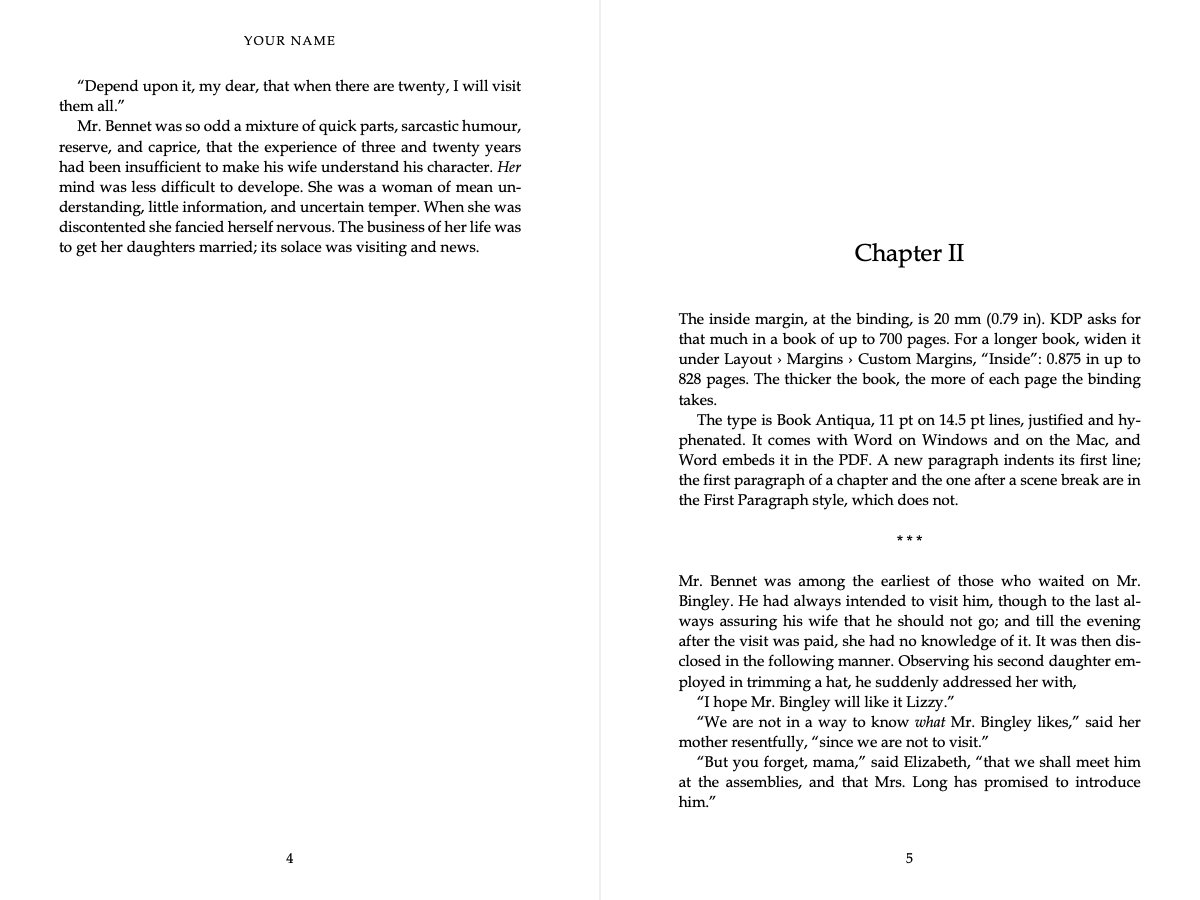
The page
| Trim | 6 × 9 in (152 × 229 mm) |
| Inside margin | 20.0 mm (0.79 in) |
| Outside | 15.0 mm |
| Top | 19.0 mm |
| Bottom | 21.0 mm |
| Type | Book Antiqua, 11 pt on 14.5 pt |
The margins are mirrored, so the wider one is at the binding on both pages. They are Kernsetzer’s own, scaled to this size, so a book looks much the same whether you set it in Word or in Kernsetzer. These are exactly the margins of Kernsetzer’s Classic theme, which was drawn for 6 × 9; the other templates scale them to their size. A 6 × 9 page holds about a fifth more than a 5 × 8 one, so the same book comes out thinner and cheaper to print.
How long the book gets
A full page of the template holds about 380 words of Austen, who writes a lot of short dialogue. Allow a page and a half per chapter for the opening space and the last, half-empty page, and a novel of 80,000 words in 25 chapters comes to about 250 pages. Long paragraphs fit more on a page, and lots of dialogue fewer. The page count calculator does the sum for your own book. For comparison, see the 5 × 8 in and 5.5 × 8.5 in templates.
A longer book
KDP’s minimum inside margin grows with the page count, because a thick book doesn’t open flat. The template’s inside margin is enough up to 700 pages. Past 700 pages, KDP wants an inside margin of at least 0.875 in (22.2 mm). Below that, the template’s 20 mm is enough at any length. To change it, open Layout › Margins › Custom Margins and set Inside; Word changes it in every chapter at once.
Exporting the PDF
On Windows, choose File › Save As, pick PDF and leave Optimize at Standard. On a Mac, choose File › Save As, set the format to PDF and pick Best for printing. Word adds a blank left page wherever a chapter would otherwise start on the left, and those pages belong in the PDF. It also embeds the font, which KDP requires; I checked that in the PDFs from Word for Mac. Then upload the file and go through KDP’s previewer page by page, which flags anything too close to the edge.
So far I have tested the templates only in Word for Mac. Microsoft ships Book Antiqua with slightly different measurements on Windows, so lines and pages may break in other places there. LibreOffice and Pages haven’t been tried yet.
The styles are the same as in the manuscript template, so a book written here also imports into Kernsetzer, which sets it from the manuscript with the same margins and does the hyphenation, the chapter openers and the widows and orphans for you. Sign up for the beta. Not sure about the size? Read choosing a trim size.
KDP’s margin rules are from its help page on trim size, bleed and margins, checked on 28 October 2026. The words per page were counted in the PDFs Word for Mac exported from these templates.