
Log › Why I’m taking the themes apart
Why I’m taking the themes apart
At the moment you pick one of three themes in Kernsetzer and take it as it is. I did that on purpose. Now I’m pulling the themes apart again so you can mix them. This post is about both, and in a few places it gets a bit technical.
Why I started with whole themes
A well-set page is mostly about things fitting together. The lines of text sit on a grid, so the lines on the left page are level with the lines on the right. The chapter opener has to leave the text under it back on that grid. Change the line spacing, and the opener has to move too. None of these choices stands on its own.
So before I gave anyone choices, I wanted whole pages to come out right. Kernsetzer sets its pages with Typst, a typesetting engine written in Rust that runs inside the app. It breaks a paragraph as a whole instead of line by line, hyphenates by language, and keeps widows and orphans off the page. Each theme was one Typst file that drew the whole book, from the title page to the last page number.
That meant I could really test them. Every theme gets set with every value of every option on the sample books, and then I look at the pages. With three fixed themes, that list has an end. It also keeps things quick for you: picking one of three looks takes a few seconds, and I want a typical novel to get from import to export in under half an hour.
What it cost
The quickest way to a second theme is to copy the first one and change it. That’s what I did, twice. Each theme ended up at 700 to 1,000 lines, and most of those lines were the same in all three. They work out what kind of page this is (a chapter start, a blank page, a page with a picture), how big the margins are and where a picture goes. Every bug in there needed fixing three times. Five more themes are planned, and I didn’t want eight copies.
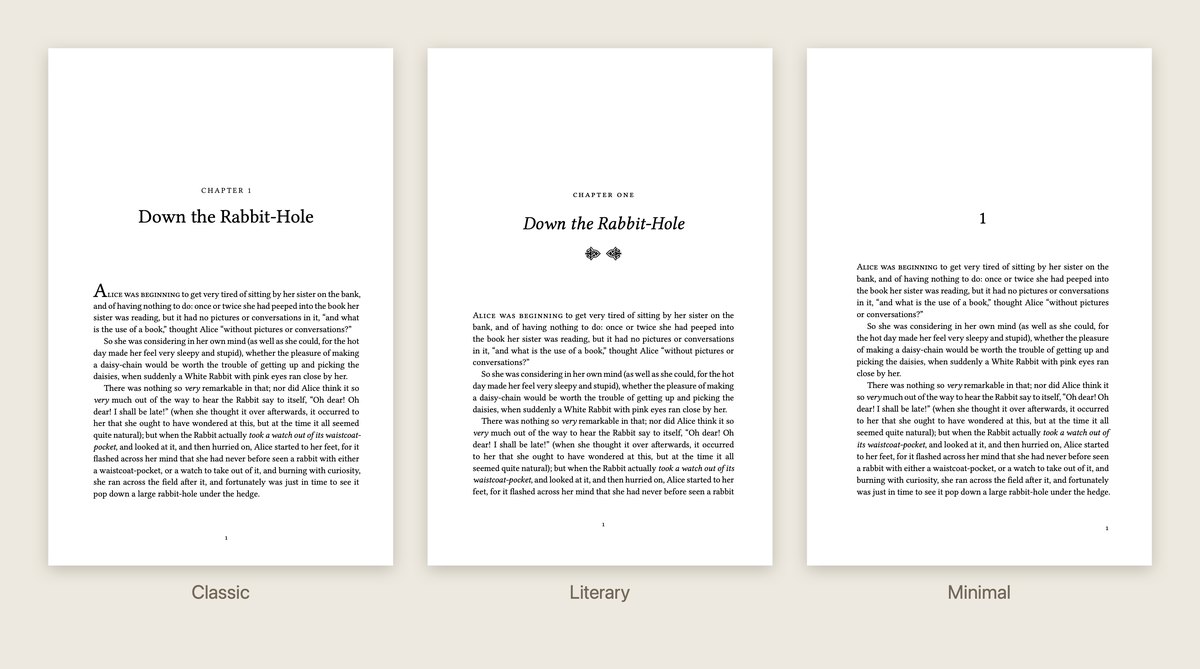
You see it from the other side. Literary spells out “Chapter One” and puts a little ornament under the title. Minimal just sets the number. Classic starts the text with a large initial. If you like Classic but want the number spelled out, you can’t have it. And every choice covers the whole book, so you can’t, say, drop the running heads in the back matter.
Taking them apart without breaking anything
So the shared code is moving into one library, with a piece for each part of the book: the line grid, chapter numbers and labels, ornaments, scene breaks, page numbers, title pages, pictures. The themes get shorter with every step. Today they’re 400 to 570 lines each, and the library holds about 1,200.
I have one rule for this: no page is allowed to change. Before and after every step, the sample books get set and compared: the code Kernsetzer generates, every line in the PDF, every page as a picture. If a single line moves, the step isn’t done. So far nothing has moved. You won’t notice any of this in the app, and if I get it right, you never will.
Then you get to mix
Once the library is done, a theme is really just a starting point: one chapter opener, one scene break, one style of running head, plus its fonts and margins. Everything lives in the library, so everything works in every theme.
You’ll still start by picking a theme, then swap out what you don’t like. You choose from small pictures, not from names. The app shows what you’ve changed from the theme and lets you put it back. A choice can cover the whole book, one kind of section (all chapters, the front matter, the back matter) or a single chapter. A few things stay the same across the whole book on purpose: the type size, the hyphenation and the margins. The line grid depends on them.
If you write a series, you’ll be able to save a book’s look as your own theme and start the next book with it. Each book keeps its own copy, so it looks the same on any computer, and changing your theme later won’t touch a finished book unless you tell it to. Your own themes will need a licence. In the beta you can already see where they’ll go.
There’s one part I’m not sure about yet. Running heads and page numbers sit in the margins, outside the chapter’s own text. If every chapter can have its own running heads, every page has to look up which chapter it belongs to. That kind of lookup is exactly what makes a long book slow to set. So before I build it, I’ll measure it on an 867-page test book, which takes about a third of a second at the moment. If it turns out too slow, running heads will only change for the whole book or a kind of section, not for a single chapter.
What you can’t break
The freedom stops where the typesetting starts. Every option has to keep the line grid, the hyphenation, the rules against widows and orphans, and the quotation marks that hang into the margin. There’ll be a few fine adjustments (the indent, the line spacing, the margins a step wider or narrower), but only as far as the page still works.
Some combinations will be allowed and still look a little odd, like a fancy opener next to plain italic running heads. The tests catch broken pages, not questionable taste. That part is up to you, and the themes are still a good place to start.
Some things stay out: your own code, putting things anywhere you like on the page, styling single words beyond italic and bold. Kernsetzer still isn’t a word processor.
Where it’s at
The library is about three-quarters done, and every page still looks exactly like it did before. Next, every option goes into every theme, and after that come the controls in the app. The beta starts on 16 November with the three themes as they are, and mixing comes during the beta. If there’s a combination you’d like for your book, tell me.