
Why Kernsetzer
This is the first post in the build log. Every week or two I’ll write here about what I’m working on in Kernsetzer. This first one covers the basics (what the app does, what it doesn’t do, and the name).
What it is
Kernsetzer is a desktop app for formatting books. It runs on Windows, macOS and Linux. You give it a manuscript from Word or Markdown and pick a trim size and a design. Kernsetzer then lays out the running heads, chapter openers, page numbers, margins and gutter. At the end you get a print-ready PDF (for KDP, IngramSpark and other print-on-demand services) and an EPUB 3 for the ebook stores.
It works offline and without an account, so your manuscript stays on your computer. You’ll buy it once. There won’t be a subscription.
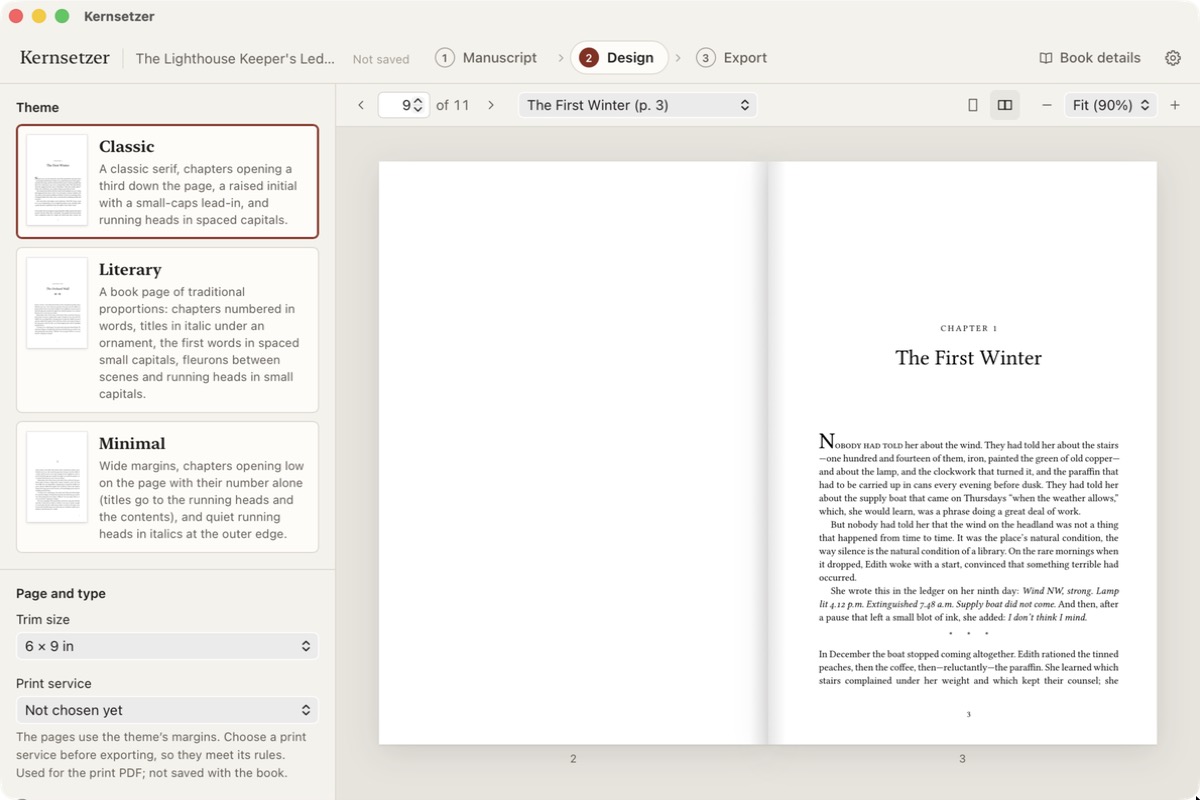
Why I’m building it
Mostly because it’s fun. I like the old craft of typesetting, and teaching a program all the small rules is a pretty good puzzle.
A Word export usually doesn’t look like a typeset book. Where the lines break and which quotation marks and dashes you get is more or less left to chance. Kernsetzer handles that the way a typesetter would. German gets as much attention as English, so „Anführungszeichen“ come out the right way round and long compound words get broken in the right place.
What it isn’t
Kernsetzer isn’t a word processor. You keep writing in whatever you use now, and Kernsetzer does the typesetting after that.
It doesn’t do covers either. You or a cover designer make the cover as a separate file. For a KDP paperback the size depends on the page count, and the free margin calculator works out the spine width and the full cover size for you.
The name
Kern is German for core, and a Setzer is a typesetter. Kerning (the spacing between two letters) also starts with Kern.
What comes next
The closed beta starts in mid-November with up to 30 authors. The next posts will go more into the details of typesetting and how the beta is going. If you have a manuscript and want to try Kernsetzer on it, you can sign up for the beta.